

How to Automatically Swap Incoming Tokens on Solana
Pricing and capability evidence checked September 21, 2026.
If tokens arrive repeatedly in your Solana wallet, converting each payment manually becomes a recurring task. Autocompounder lets you select the token to spend, the token to receive, and the total amount that may be converted. You approve setup in your wallet, then monitor the resulting configuration.
This guide covers the practical sequence. It does not assume every received token is supported or every deposit will convert immediately. For the underlying model, read what a Solana autocompounder does.
How do you automatically swap incoming tokens on Solana?
Open Autocompounder, connect the wallet receiving your tokens, choose the input and output assets, and review a total spending limit. Approve setup in your wallet. The keeper can then convert available approved input tokens, including existing holdings, when routing, account checks, and execution economics permit a swap.
What should you check before setup?
Confirm that you are using the wallet that actually receives the token. A balance held inside an exchange account or another protocol is not the same as a token account controlled by your connected wallet. Check the mint address on a trusted explorer rather than relying on a ticker or image.
Also review the input tokens you already hold. Automation does not label individual units as old holdings or new rewards. If you approve an account containing tokens you want to keep, those tokens may be converted up to the approved amount. Use a limit and wallet arrangement that match your intent.
Keep enough SOL available for the setup transaction and any required account creation. The ongoing keeper transaction is a separate operation. Do not interpret the absence of another wallet prompt as proof that no future swaps can occur after you approve setup.
How do you choose the input and output tokens?
Open Autocompounder and connect your wallet through the normal connection control. In the new configuration form, choose the asset you intend to spend under When I receive. Under Autoconvert into, choose the asset you want back. These must be different tokens.
Use the token picker's address and explorer link to distinguish similarly named assets. Inspecting the address is especially useful for community tokens whose names can be copied. Select the actual Solana mint rather than assuming a token with a familiar ticker is the asset from another network.
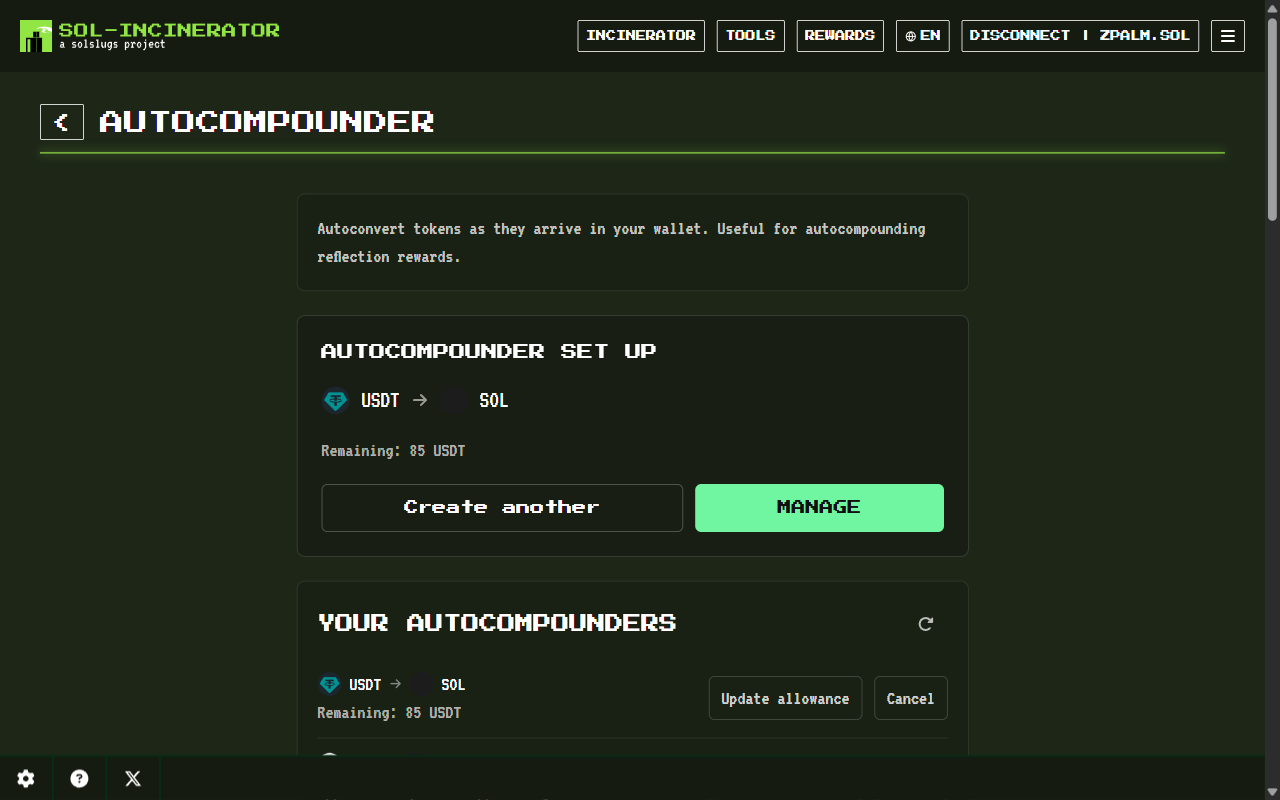
If the input already has a configuration, the page offers management of that setup. Its displayed output is the saved destination. Use Manage to reach the existing row, or Create another to clear the selectors and start another pair. A saved setup is not an error requiring another approval.
How do you set the total spending limit?
Enter the maximum number of input tokens available across future swaps. The displayed currency estimate is supplementary; the signed permission is for a token quantity. Review the amount itself even when the initial default looks familiar or prices have changed since your last visit.
For illustration, approving 5 tokens does not allow 5 per deposit. If a swap spends 2, the remaining allowance is 3. Further deposits do not automatically replenish that permission. The spending-limit guide explains renewal and replacement in detail.
Do not enter zero as a substitute for cancelling an existing setup. The allowance form requires a valid positive amount. Use the configuration's cancellation action when the intended outcome is to stop future execution.
What happens when you approve in your wallet?
Choose Enable Autocompounder after checking both assets and the amount. The application prepares the setup transaction and asks your wallet to sign. Review the approval, fee, and account-creation effects before confirming. A wallet warning about future spending refers to the delegated authority you are granting.
If you reject the request before submission, the setup remains editable. If a transaction was submitted and is still pending, inspect its status before trying again. Repeating an approval is not a way to refresh a delayed read of the first transaction.
After confirmation, the page shows the configured pair with management actions. A successful setup transaction records permission; it is not itself evidence that your input tokens have already been exchanged. The remaining allowance may briefly be pending while the page retrieves authoritative account state.
How do you verify the first swap?
Check the input balance, output balance, and remaining allowance together. A completed swap should consume the approved input, deliver output to your wallet, and reduce the remaining input allowance accordingly. Use the confirmed transaction on a Solana explorer to distinguish the service fee from other token movements.
The service fee is currently 1% in the output token. Token transfer taxes can additionally reduce spendable output. The keeper pays swap transaction costs, while you pay setup costs. Comparing only dollar estimates can hide what happened because market prices may change between observations.
If your wallet receives additional rewards while you are checking, its total balance change may not equal the swap amount. Use the transaction's account changes and instruction details to isolate that execution. The same principle applies if you manually trade the token during the check.
Why might tokens remain waiting?
An empty input account, exhausted permission, unavailable route, incompatible token state, or service delay can prevent execution. Small balances may wait until the expected fee covers the keeper's costs. A token appearing in search does not guarantee a successful route for every amount at every moment.
Check the displayed allowance state before raising the limit. More permission cannot create liquidity or repair an unavailable service. If the balance and approval look correct but execution remains delayed, preserve the relevant transaction details and seek support rather than repeatedly signing replacements.
How do you change or stop the setup?
Use Update allowance on the existing row to set a new remaining input quantity, then approve the update in your wallet. To stop, use that row's Cancel action and verify confirmation. Closing the browser or disconnecting the wallet does not perform cancellation.
If you only want one immediate trade with a fresh signature, the ordinary swap tool may fit better. Read the manual dust-swap guide for that workflow. Autocompounder is useful when continued permission and repeated conversion are intentional.

Autocompounder
Set up automatic token conversion with a selected destination and a cumulative spending limit.
Related Reading
Frequently Asked Questions
Can I automatically swap tokens received in my Solana wallet?
You can configure supported input and output tokens in Autocompounder and approve a cumulative input-token allowance. An authorized keeper then attempts eligible swaps when a balance is available. Existing input tokens can also be spent, and each execution depends on routing, account compatibility, and sufficient value.
Why has my automatic swap not happened yet?
Check the actual input balance, remaining allowance, and token accounts first. A route may be unavailable, the balance may be too small to cover execution costs, or the service may be delayed. A confirmed setup authorizes future execution; it does not prove that a swap has already completed.
Do I need to leave the page open?
The keeper submits swaps independently of the browser after setup. Closing the page or disconnecting your wallet does not cancel the on-chain approval. Reopen the tool to review the configuration, and use its cancellation action when you want to stop future swaps rather than simply ending the browser session.