

Autocompounder Spending Limits: How to Update or Cancel Your Approval
Pricing and capability evidence checked September 21, 2026.
The spending limit is the boundary on how much of your input token Autocompounder may use. It is not a target balance, an amount reserved in a vault, or a promise to trade that exact quantity immediately. Understanding its units and replacement rules prevents unintended renewals.
The creation form calls it Total spending limit. Existing configurations show the remaining allowance, and the update dialog asks for a new remaining amount. These labels describe successive states of the same input-token permission.
Is the limit per transfer or across all swaps?
Autocompounder's spending limit is cumulative across swaps and measured in the input token. Each delegated spend reduces the remaining allowance. Deposits and price changes do not reset it. When the allowance is exhausted, further conversions require another approval, even if tokens remain available in the input account.
For illustration, approve 10 input tokens and let a swap consume 3. The remaining allowance is 7. If the next deposit brings in 20, permission is still limited to 7; the deposit does not create another 10-token allowance. This is arithmetic, not an example of a completed user transaction.
The same rule applies to tokens held before setup. The keeper uses available balance and remaining delegation to determine the possible input. It does not maintain a separate exemption for older purchases or distinguish reward deposits from other transfers into the same account.
How is remaining allowance updated?
The token account stores delegated permission on-chain. Successful delegated spending consumes that permission. The interface reads the current approval state and formats the raw amount using the input mint's decimals. A configuration record and its live remaining allowance are related but separate pieces of data.
After a confirmed creation or update, the page can show the known result while the authoritative allowance read catches up. A pending or unavailable allowance is not the same as zero. Wait for a current value or inspect the account; do not authorize another transaction merely to make a read refresh.
Concurrent activity can complicate comparisons. A swap may consume allowance while you are viewing the page or preparing an update. Read the new quantity as a permission you are about to set, not an immutable prediction based on an earlier screenshot.
Does the dollar estimate cap my spending in dollars?
No. The approval is for a number of input-token units. Its market value can rise or fall after you approve. The currency estimate helps you assess the amount at the observed price; it does not turn the approval into a dynamically maintained dollar budget.
Choose the token quantity deliberately, including any balance you already hold. If price information is unavailable, do not infer a value from an old estimate. A smaller allowance can limit the quantity exposed to future execution, but it does not guarantee a price or a maximum investment loss.
What does updating the allowance do?
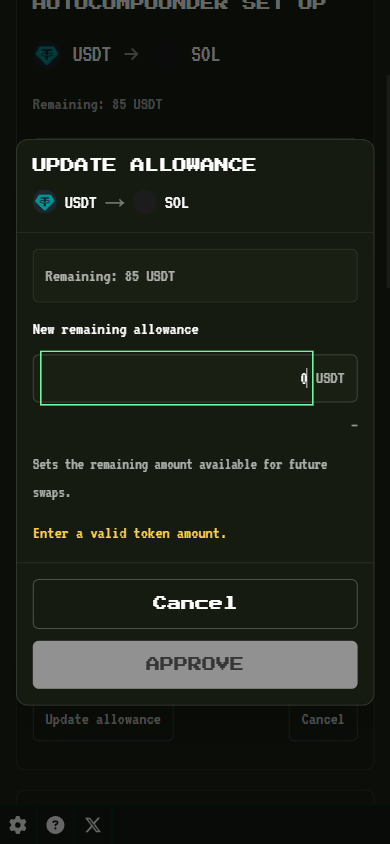
Open Update allowance for the saved pair. The dialog shows the last available remaining amount and a field for the new remaining allowance. Enter the quantity you want available after the update and approve the transaction. This replaces remaining permission rather than adding to it.
If 7 tokens remain and you enter 5, the resulting allowance is 5, not 12. If you intend to make a total of 12 available from that point onward, you must approve 12. Previously consumed tokens are historical activity, not an amount automatically restored by the update.
Solana's approval documentation explains that an account has one current delegate and allowance. Approving another delegate elsewhere can replace the permission this configuration needs. The saved pair can still exist even when its required token approval is no longer usable.
What happens when allowance reaches zero?
The configuration cannot spend additional input through exhausted permission. The page reports the exhausted state and offers approval again. Tokens can remain in or arrive at the account while execution is stopped; the account balance alone does not demonstrate that automation is still authorized.
Renew only if you still want the stored input-to-output conversion. Check both token addresses and your current holdings before approving another amount. A configuration created for a previous strategy should not be renewed simply because the interface offers an update action.
Entering zero in the update form is not the cancellation workflow. The form accepts a valid positive token amount. Use Cancel when your intent is to remove the setup and stop future execution.
How do cancellation and revocation differ?
Autocompounder's cancellation flow removes the configuration and clears its input approval when applicable. Confirm the transaction and check the resulting state. A transaction that failed or is still pending does not establish that the setup was removed. A completed earlier swap is not reversed.
An account-level revoke clears the token delegate and allowance, which stops that delegated spending path, but does not necessarily remove the separate configuration record. The general revoke guide explains that broader tool. Use the Autocompounder cancellation action when you want to remove its setup completely.
Disconnecting a dApp is different again: it ends the browser-wallet relationship rather than editing on-chain permission. See disconnecting versus revoking if you are unsure which action you performed. The keeper does not need your browser tab to stay open.
Will closing an empty account interfere?
An empty balance does not necessarily mean an account is unused. It can be the intended destination for future rewards and still have remaining Autocompounder permission. Sol Incinerator cleanup preserves supported empty input accounts with unused approval so ordinary cleanup does not interrupt that arrangement.
When usable approval is exhausted or removed, ordinary cleanup eligibility can apply, subject to the other account checks. Manually closing an input account removes that account's permission; recreating the address later does not restore its previous delegated allowance automatically.
If a configuration reports approval required after an account was closed, review and approve again only if you want to resume. Closing accounts, revoking permissions, and cancelling configurations have different effects, so choose the action that matches the state you intend to leave behind.

Autocompounder
Review remaining input-token permission, set a replacement allowance, or cancel a saved configuration.
Related Reading
Frequently Asked Questions
Is the spending limit per transfer or across all swaps?
It is a cumulative input-token allowance across swaps. Each delegated spend reduces the amount remaining. New deposits do not reset that allowance, and the limit is not renewed daily. When it is exhausted, further swaps need a new approval even if the input account still holds tokens.
Does updating the allowance add to the remaining amount?
No. The update sets a new remaining allowance. If seven tokens remain and you approve five, the new remaining permission is five, not twelve. Review the token quantity in the update dialog; any displayed currency estimate is informational and can change independently of that quantity.
Does wallet cleanup stop my Autocompounder?
Cleanup preserves supported empty input accounts that still have unused Autocompounder approval. When no usable approval remains, ordinary cleanup rules can apply. Manually closing the input account or revoking its delegate stops execution until the required account and permission are restored; neither action reverses previous swaps.
How do I cancel an Autocompounder?
Use Cancel on the saved configuration and approve the cancellation transaction in your wallet. Verify confirmation and the resulting state before assuming it stopped. Closing the page or disconnecting the wallet does not revoke the on-chain approval, and a cancellation cannot undo a swap already executed.